Saturday, September 3, 2016

Wrapping up our first projects for the year

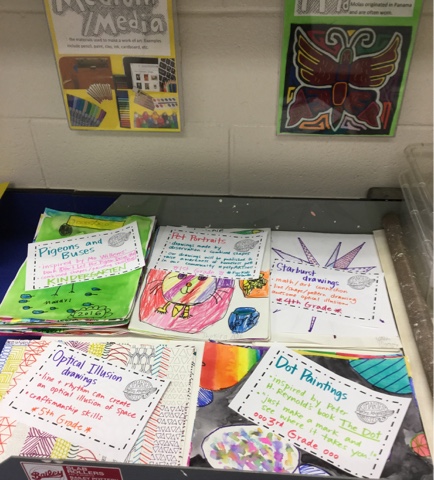
We are four weeks in now that we have hit Labor Day weekend and we have a lot to show for it! Everyone has a portfolio, all classes are in Class Dojo, seating charts have been learned, and art making is happening! In fact, most classes started project #2 this week. Our focus across all grade levels for our first 9 weeks is experimenting with the 7 elements of art, in different ways with each grade.

Kindergarten artists carried on our tradition of making illustrations for Mo Willems' book Don't Let the Pigeon Drive the Bus, using combined geometric shapes and learning to use watercolors. They love it every year, and I love connecting literacy.


First and second graders were the first to start pet portraits for our #petpARTners project, which will raise awareness of our local animal shelter, FurKids Atlanta. We are using observation skills, like looking for shapes, to draw the animals from the shelter. We will be posting these online through our social networks and around some local businesses this year. Artists help solve problems in their community!


Second graders read the book Ish by Peter H. Reynolds to give them confidence - pet drawings don't have to be perfect, they can be dog-ish or cat-ish! Love the message in this book.


Third graders also read an inspiring Reynolds book, The Dot. Like Vashti, the main character, we made lots of different kind of dots, but we combined ours into a single artwork unlike Vashti's multiple artworks of single dots. 


Fourth grade created beautiful Starburst designs with a 3-D quality. We followed the steps found on the ilovethatteachingidea.com site. Such eye-popping designs!


Fifth graders also tried an optical illusion drawing, filling vertical rows with contrasting line patterns, giving a look of motion and form. Craftsmanship skills were stressed for achieving an effective illusion.


Now it is time to get these beauties up in the halls for all to see! 

Thanks for stopping by! Back to the planning book...


Saturday, August 27, 2016

Get your class publishing with ARTSONIA!

                              
If you have been thinking about using Artsonia digital portfolios in your art room, I have some options that may be perfect for your particular classroom setup. In this post, I will explain my flexible stations and how to get the kids independently publishing using Classroom Mode.
I have loved using Artsonia the last couple of years for several reasons - it fulfills technology and assessment requirements, students enjoy seeing their portfolio grow from year to year, it is a wonderful way to get and give feedback, and families love it - there is even a fundraiser aspect that is no extra work for you!
                                  

Newbies
If you are new to Artsonia, you will need to establish your account, upload your students (you can send them a spreadsheet), and create the first project for the kids to upload to. Some people have many different projects, but I find it simpler to just call mine "unit 1 favorites, unit 2 favorites" etc. and change the name each 9 weeks or semester. The good news is that once you have the names in and parents have signed on, you are in and you don't have to repeat that step year after year - Artsonia will even help you organize your classes each new year. If a parent doesn't sign on, students can still participate and their work can be seen in the Teacher Mode in class, it just isn't posted online publicly without a parent account.
The first time I did it, I started with just one class to get the hang of it, then started adding more and by the end of year everyone was participating. Baby steps!

Lack of space?
I posted recently about my Artsonia Station in my classroom that accommodates up to five kids at a time - I use the school's poster enlarger to print the info poster size. If you have a smaller space, the Artsonia Station will work for you too - the signage can be printed small for a mini-station, as seen in the very top photo - I have my mini-station set up in a shared classroom across the hall for spillover or if kids from other classes want to upload. Even if you have no extra space at all, the Station can be printed as a double-sided handout and added to sketchbooks/portfolios and kids won't need to leave their spots.
https://www.teacherspayteachers.com/Product/Artsonia-Station-instructional-display-and-handout-2722191


Uploading in action
Ally, Corinne, and Harper helped me put together this little pictorial on how easy it is to use. In my room, the 2-5 graders do their own uploading - when complete, the projects wait to be approved by me before they are posted - approving is easy, just a click, and I can do editing from my end if necessary or I can send it back to the student. K and 1 students work along with me to upload - I use teacher mode often in this case because I don't have to approve the work afterwards.
Here we see Ally opening the app, scanning the QR code, choosing the project and editing her photo.

She can add an artist statement and see her current and past work. Ally is in 5th grade and knows how to upload independently when she finishes a project, or at different stages.

Corinne and Harper are in K and 1, so they work with me (or an older student if you can round up a few!). Here they are getting started...

Photographing, editing, and adding titles...

This mini-station is perfect for 1-2 students - the next pictures are from my larger station, which was the "prototype" for the one I am currently offering on Teachers pay Teachers. I will be blowing up my new design on the school poster maker and updating this to my latest design pronto. It has been a fantastic addition to the art room, and the kids take so much pride in publishing their works!


Thanks for stopping by and let me know if I can help you with your publishing needs!
https://www.teacherspayteachers.com/Product/Artsonia-Station-instructional-display-and-handout-2722191


Friday, August 19, 2016

Year 25 - here we go!


Welcome back, Smartest Artists and Dolvin families! This is the beginning of a big milestone for me - my 25th year as an art teacher - and I'm hoping to make it a memorable one, beginning with my new logo here. I had fun with its evolution...
Let's start out with a little room tour - I tried to get a panoramic shot but failed miserably, so just imagine the next group of pics in order and connected :).
I am really lucky to get to spend my school days in such a fantastic room with everything we need.


This year, my artists are going to focus on a community service project, #petpARTners, which will promote awareness of the animals in our local shelter FurKids. They are loving it so far!

Class Dojo is almost completely set up, so those points should start rolling in soon! It is a classroom management system that is fun to use and a quick way to share some behind the scenes shots with families.

We will also continue developing our Artsonia digital portfolios once we get a couple of projects completed. Here is our uploading center - you can get the information for a station like this here at my Teachers pay Teachers store: https://www.teacherspayteachers.com/Store/Mrs-Knights-Smartest-Artists


Many teachers in my school are using Seesaw for their classroom digital portfolios, so I made a similar station for them, also in my TpT store.  https://www.teacherspayteachers.com/Store/Mrs-Knights-Smartest-Artists
Here it is on display in Mrs. Endicott's music room:


Lots of art is already in the works... We keep our work in these handy portfolios, which will go home at the end of the year.

Have a restful weekend and thanks for stopping by!